Apple Vision Pro — Sistema de movimento UX
- Função
- Designer de movimento UX principal
- Foco
Aplicação de tokens de temporização do sistema a elementos reais da interface
- Escopo de movimento
- Microinterações
- Mudanças de estado
- Confirmações de interface do usuário
- Sistema de temporização
- Rápido (120 ms)
- Médio (240 ms)
- Lento (480ms)
- Ferramentas

O movimento define a hierarquia
Profundidade espacial, não zoom
Hierarquia de ritmo
Tempo como emoção
Coreografia de heróis
Sistema de movimento de cartão de álbum
Profundidade espacial, não zoom
Hierarquia de ritmo
Tempo como emoção
Varredura de luz
Sistema em repouso
O movimento desaparece quando não é mais necessário, permitindo que a interface permaneça calma, clara e discreta.
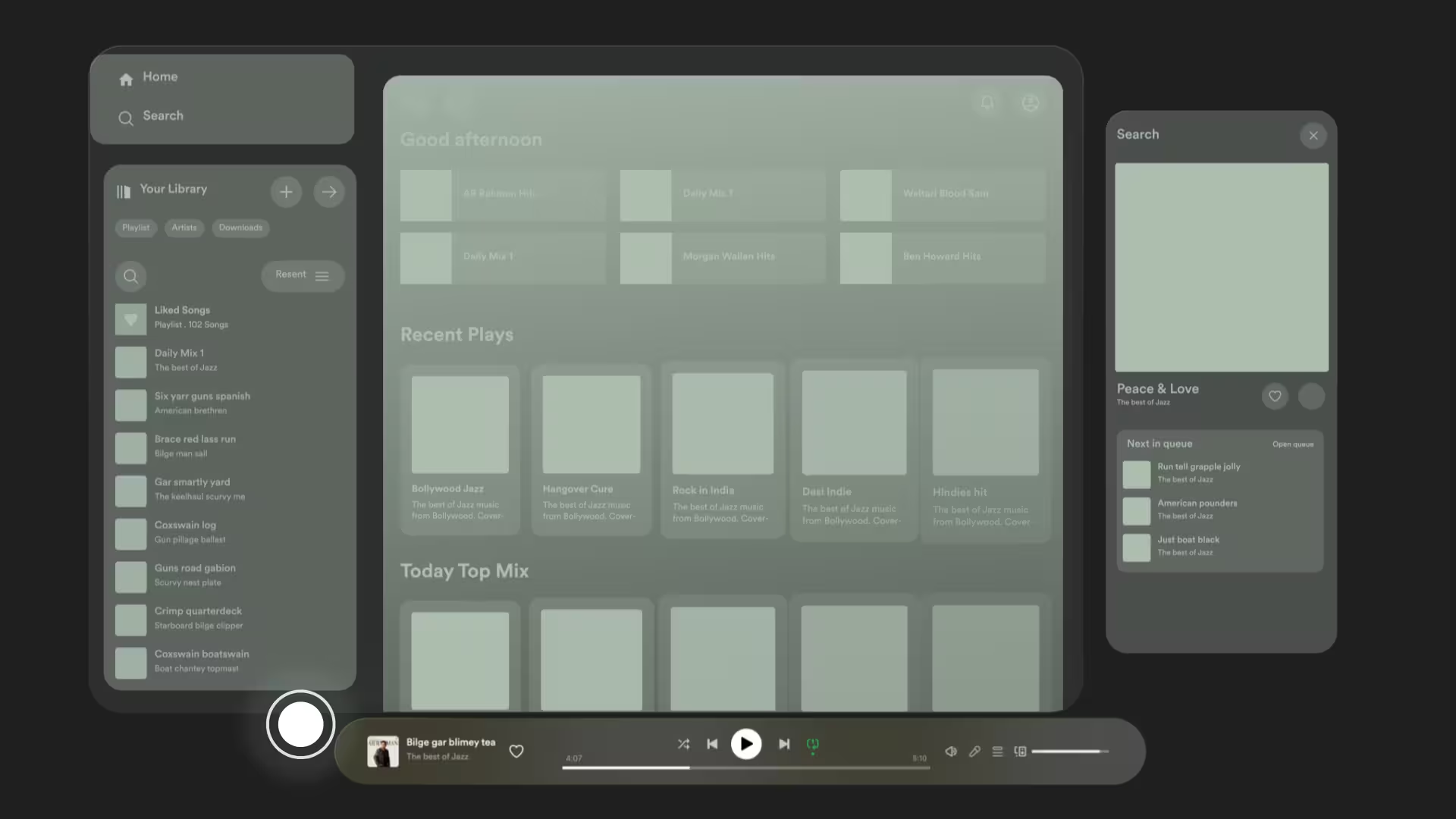
Profundidade contextual e prioridade de foco
caminho preditivo e reconhecimento do sistema
Avaria do sistema de movimento
Princípios
As regras fundamentais que governam como o movimento se comporta em todo o sistema, definindo quando os elementos se movem, como eles fazem a transição e como o tempo, a profundidade e a hierarquia funcionam juntos para guiar a atenção com moderação.
Mapa de temporização
Movimento aplicado
Carretel


.jpg)



1
Visão geral da construção



2
Fundamentação criativa
Objetivo
- Explore como o movimento reforça a profundidade espacial e a hierarquia no VisionOS.
- Mostra transições de painel naturais e fluidas que refletem a linguagem de design da Apple.
- Crie interações imersivas que tornam a exploração musical intuitiva e agradável.
Processo
Principais destaques
Informações detalhadas
Mergulhos profundos
Ciência da aprendizagem
Tempo como emoção
2
Fundamentação criativa
Objetivo
Desafios
Processo
Impacto e resultados
Resultados mensuráveis
Entrelinhas
1
O resumo
Objetivo
- Explore como o movimento reforça a profundidade espacial e a hierarquia no VisionOS.
- Mostra transições de painel naturais e fluidas que refletem a linguagem de design da Apple.
- Crie interações imersivas que tornam a exploração musical intuitiva e agradável.
Desafios
- Projetando movimentos que pareçam sutis, sem distrações, em um ambiente de realidade mista.
- Garantindo a legibilidade da interface ao mesmo tempo em que integra camadas espaciais 3D.
- Equilibrando ambientes visuais ricos com movimentos favoráveis ao desempenho.
Objetivos de aprendizagem
Ritmo como hierarquia
Ciência da aprendizagem
Tempo como emoção
Metodologia de aprendizagem
- Rápido (120 ms)
- Médio (240 ms)
- Lento (480ms)
Processo
Impacto e resultados
Paralaxe de profundidade
Resultados mensuráveis
Revelação da nota
Entrelinhas
Flutuador flutuante
Acessibilidade e inclusão
Porteiro de luz
3
Resultados
Apple Vision Pro — Interface de usuário do Spotify
Nenhum item encontrado.


Apple Vision Pro — Interface de usuário do Spotify
Nenhum item encontrado.
.avif)
.jpg)

.jpg)